Hardware Assembly
Pin Connections
regarding GPIO pin setup, you can refer code include/config/pins.h
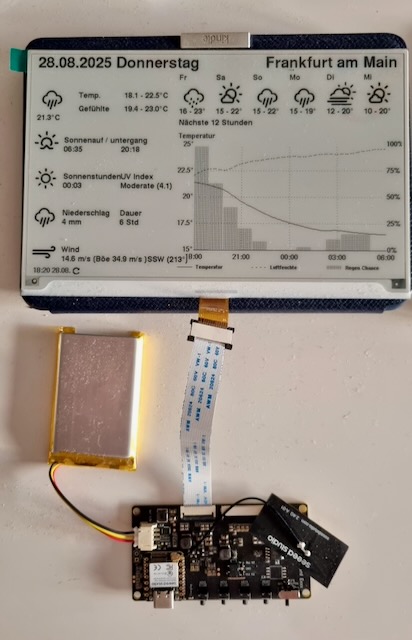
Seeedstudio EE04 Board ESP32-S3
ESP32-C3 Super Mini Wiring
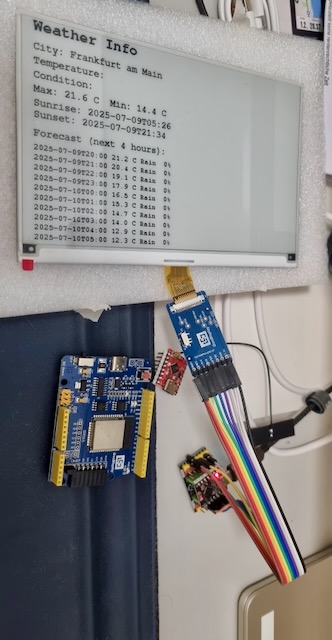
The ESP32-C3 requires 8 connections to the e-paper display:
| E-Paper Pin | Function | ESP32-C3 Pin | GPIO | Wire Color Suggestion |
|---|---|---|---|---|
| BUSY | Busy Signal | A2 | 2 | Yellow |
| CS | Chip Select | A3 | 3 | Orange |
| SCK | SPI Clock | SCK | 4 | Green |
| SDI (MOSI) | SPI Data | MOSI | 6 | Blue |
| RES | Reset | SDA | 8 | Purple |
| DC | Data/Command | SCL | 9 | Gray |
| VCC (3.3V) | Power | 3.3V | - | Red |
| GND | Ground | GND | - | Black |
you can add 3 buttons for changing display modes manually
ESP32-C3 Super Mini          E-Paper Hat (DESPI-C02)
┌─────────────────┐         ┌─────────────────────────────┐
│                 │         │                             │
│ 3.3V      ●─────┼─────────┼─● VCC (3.3V)                │
│ GND       ●─────┼─────────┼─● GND                       │
│                 │         │                             │
│ GPIO 2    ●─────┼─────────┼─● BUSY                      │
│ GPIO 3    ●─────┼─────────┼─● CS                        │
│ GPIO 4    ●─────┼─────────┼─● SCK                       │
│ GPIO 6    ●─────┼─────────┼─● SDI (MOSI)                │
│ GPIO 8    ●─────┼─────────┼─● RES                       │
│ GPIO 9    ●─────┼─────────┼─● DC                        │
│                 │         │                             │
└─────────────────┘         └─────────────────────────────┘
TRMNL 7.5" (OG) DIY Kit Wiring (out of box)
The ESP32-S3 requires 8 connections to the e-paper display:
| E-Paper Pin | Function | ESP32-S3 Pin | GPIO |
|---|---|---|---|
| BUSY | Busy Signal | GPIO 4 | 4 |
| CS | Chip Select | GPIO 44 | 44 |
| SCK | SPI Clock | GPIO 7 | 7 |
| SDI (MOSI) | SPI Data | GPIO 9 | 9 |
| RES | Reset | GPIO 38 | 38 |
| DC | Data/Command | GPIO 10 | 10 |
| VCC (3.3V) | Power | 3.3V | - |
| GND | Ground | GND | - |
| Button Function | ESP32-S3 GPIO | Connection |
|---|---|---|
| Half & Half Mode | GPIO 2 | Button → GND |
| Weather Only Mode | GPIO 3 | Button → GND |
| Departure Only Mode | GPIO 5 | Button → GND |
💡 Tip: Use momentary push buttons (normally open)
Battery Connection
-
Identify battery connector
- Most ESP32 boards have a JST connector for LiPo batteries
- Check polarity: Red (+), Black (-)
-
Connect battery
- ⚠️ IMPORTANT: Verify polarity before connecting!
- Wrong polarity can damage the board
- Match red to red, black to black
-
Test with multimeter first
- Check battery voltage: should be 3.7-4.2V
- Verify polarity matches board connector
Safety Notes
⚠️ Important Safety Information:
-
LiPo Battery Safety:
- Never short circuit battery terminals
- Don't puncture or damage battery
- Charge at appropriate rate (1C max)
- Monitor temperature during charging
- Store at 50-60% charge if not using
-
Soldering Safety:
- Use in well-ventilated area
- Don't touch hot iron tip
- Use proper ventilation/fume extraction
- Wash hands after handling solder
-
Electrical Safety:
- Disconnect power before making connections
- Verify polarity before connecting battery
- Don't exceed voltage ratings (3.3V for display)